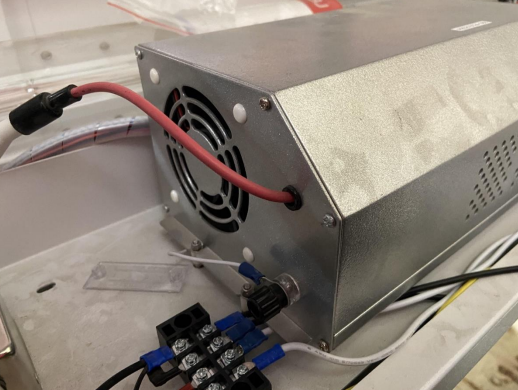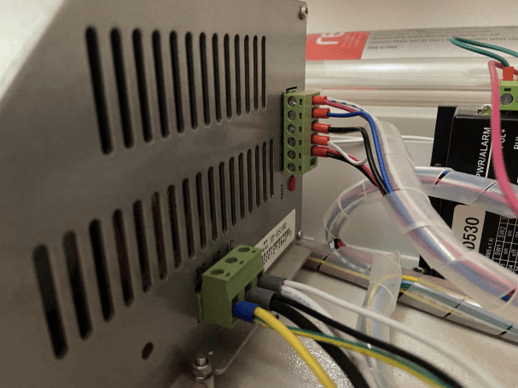
A guide for checking if voltages are nominal on the machines power supply units.
When measuring the voltage of the power supply, make sure the multimeter is set to the proper setting.
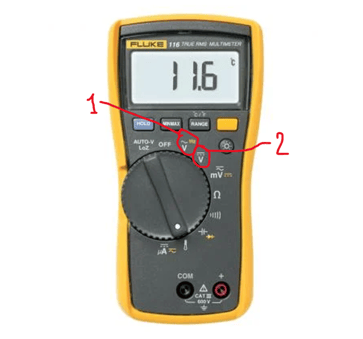
To measure an AC output/input, make sure the dial is set to the first setting (1). If measuring for DC output or input, make sure the multimeter is set to the second setting (2).
The following are the power supply parts in the machine.
1 – JMDs
2 – 36V Power Supply
JMD Power Supply
For the several machine models, there are different JMD models to power different components within the machine. The models are:
- JMD30-24; 24V
- JMD20-12; 12V
- JMD30-245; 24V and 5V
- JMD30-2412; 24V and 12V
JMDs 1, 2, and 3 are used in the bigger laser machines (2816 and larger). JMD 4 is used in the smaller laser machines (2616 and smaller).
2816 machines and up
The 2816 machines use the 3 JMD models to power different components within the machine. JMD30-24 is used to power the LED light switch and two separate LEDs. JMD20-12 powers the water pump of the machine. The JMD30-245 powers the red dot diode and switch, along side the temperature gauge and amp meter.
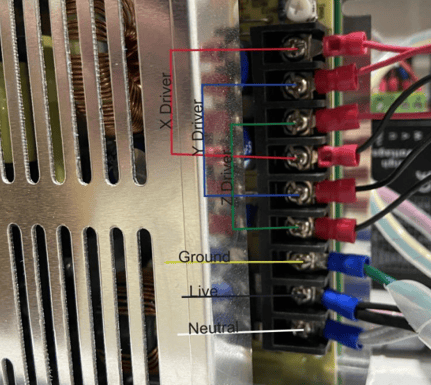
36V Power Supply 1812 – HW360-36
Input: 120V AC
Output: 36V DC
When measuring the DC output, make sure to measure for each of the different drivers to ensure each is outputting 36V.
When measuring the AC input, make sure to measure ether between the live and ground wire or the live and neutral wire to check if it is inputting 120V. Measuring between the ground and neutral wire would read 0V since they are not connected.
Laser Power Supply 2816+ -HY-ES100
Output: Varying
Input: 120V
The laser tube receives varying amounts of power based on the settings of the file to be cut. The voltage input of the machine should be 120V AC. Thus when measuring, make sure to measure once again between the black and white or black and green wires. Do not measure between white and green because the measured voltage will be 0V.