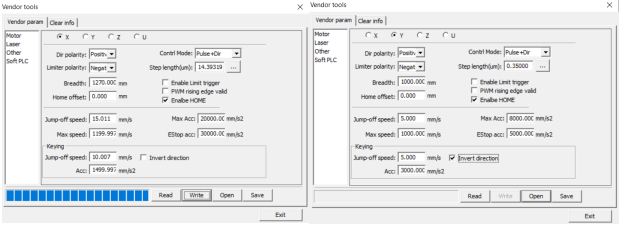
Guide for changing homing point startup settings (top left, top right, bottom left, bottom right).
To change the homing point on startup, you must have RDWorks open and have access to the vendor settings for the machine. When connected to the machine, turn on the machine. To access vendor settings, you must enter the password rd8888. Once in the vendor settings, read the current settings that are in the machine. There are four possible positions for homing; top left, top right, bottom left, bottom right.
*Note: This is assuming these are default settings for top left homing for all the AP Lazer machines. However, if this is not the case for all machines, then I suspect that you must only reverse the axis direction settings, meaning the Dir polarity setting and the invert direction box are to be reversed to reverse the direction of the homing of said axis.*
For default top left settings, go into the x-axis settings and set Dir polarity to negative, limiter polarity to negative, and check the invert direction box. In the y-axis settings, set Dir polarity to negative, and uncheck the invert direction box.
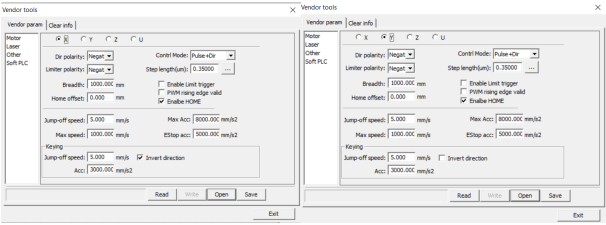
For top right settings, this requires you to swap the x-axis homing direction. Thus, go into x-axis settings and set Dir polarity to positive, limiter polarity to negative, and uncheck the invert direction box. In the y-axis settings, set Dir polarity to negative, limiter polarity to negative and uncheck the invert direction box.
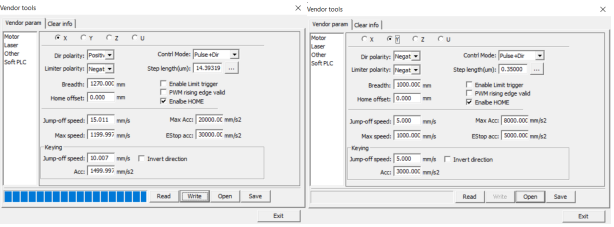
For bottom left settings, this requires you to swap the y-axis homing direction. Thus, go into the y-axis settings and set Dir polarity to negative, limiter polarity to negative, and check the invert direction box. In the y-axis settings, set Dir polarity to positive, limiter polarity to negative, and check the invert direction box.
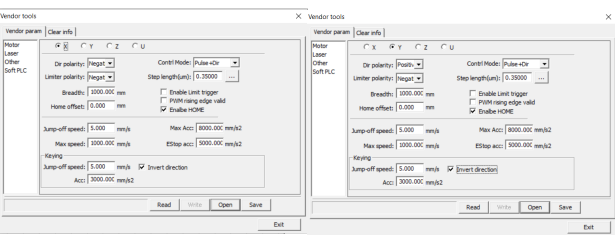
For bottom right settings, this requires you to swap both the x and y-axis homing directions. Thus, go into the x-axis settings and set Dir polarity to positive, limiter polarity to negative, and uncheck the invert direction box. In the y-axis settings, set Dir polarity to positive, limiter polarity to negative, and check the invert direction box.