![logo h white.png]](https://cptest.aplazer.com/hs-fs/hubfs/Images/Logos/logo%20h%20white.png?height=40&name=logo%20h%20white.png)
Just to be 100% certain if the issue pertains to the laser tube or the laser power supply, I just want to see if the laser lights up when pulsed manually. In the photo below, we will be looking at the laser power supply, circled in red.
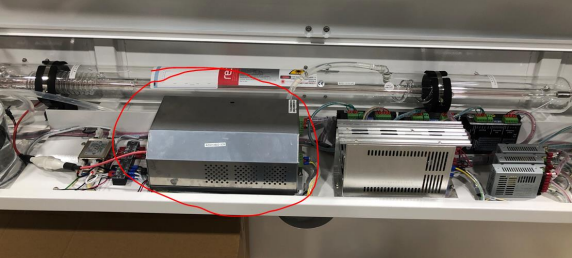
We will need to disconnect the green connector shown in the picture below, which should be on the right side of the laser power supply. After disconnecting the green connector, you can press the red button when the machine is on as shown below, and see if the laser tube lights up. You can also put masking tape at the end of the laser tube to see if it marks.
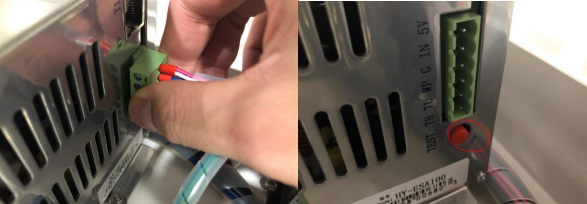
If the tube still does not light up, please let me know and let me know if the fan in the laser power supply is working.
If the laser does fire, please plug the green connector back in to proceed to the next step of troubleshooting.
For this test you will need to bypass the door limit switches, which are the blue boxes with cross-hairs on them. To do so, you will need metal such as screws or washers. As shown below, once metal is put on them, they should light up. Now you should be able to fire the laser without closing the doors.
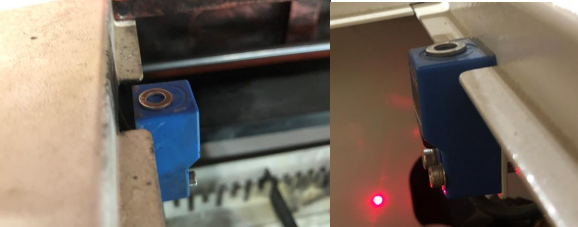
When this is done, put tape over the end of the tube, and press down the pulse button and have someone watch the tube to see if the laser tube lights up. Also check if the laser marks the tape at the end of the tube.